top of page
  • May 31
  • 4 min read

Updated: Jun 6

Framer has become one of the most powerful tools for building modern websites, especially for designers who want flexibility, animation control, and a smooth visual workflow. But despite the growth of Framer CMS, one limitation has continued to affect content-driven websites:

Native CMS slideshow functionality still feels limited.

Most carousel solutions either require complicated setups, lack proper CMS integration, or fail to feel truly native inside the Framer ecosystem.

That is where CMS Slideshow Pro comes in.


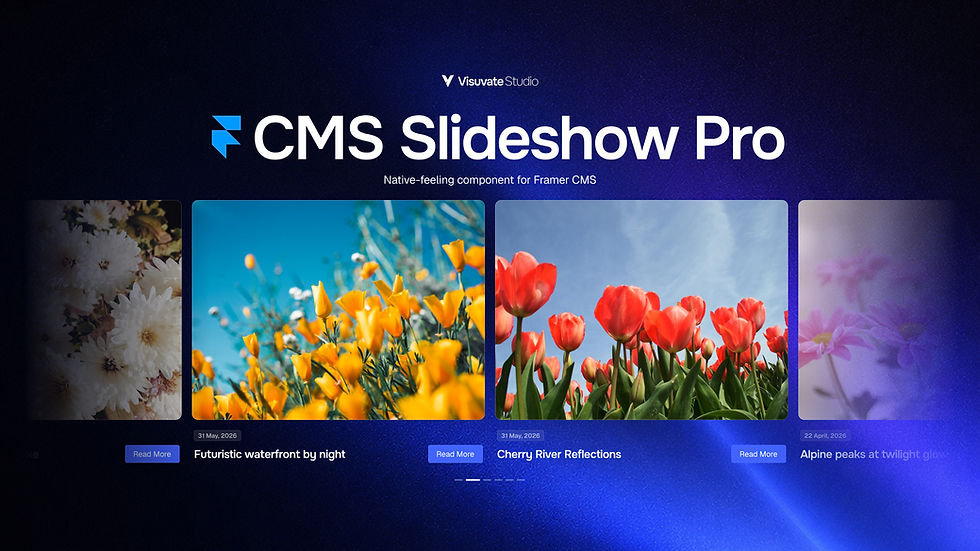
CMS Slideshow Pro is a powerful and highly customizable slideshow component built specifically for Framer CMS collections. It transforms any Collection List into responsive slideshows, infinite carousels, or continuous marquee layouts with advanced controls and native-feeling interactions.

Advanced CMS Slideshow for Framer
Framer Component

CMS Slideshow Pro

CMS Slideshow Pro is an advanced carousel component for Framer built for dynamic CMS collections.


Built for Modern Framer Websites

CMS Slideshow Pro was designed for real-world Framer projects where flexibility, responsiveness, and advanced controls matter.

Whether you are building:

  • Portfolio websites

  • Blog layouts

  • Testimonials sections

  • Product showcases

  • Team member sections

  • Logo marquees

  • Featured content sliders


The component adapts seamlessly to modern responsive layouts.

Instead of manually creating slides or relying on complex workarounds, designers can simply connect a Framer Collection List and instantly generate dynamic CMS-powered slides.


Dynamic CMS Collection Support

The core functionality of CMS Slideshow Pro is its ability to work directly with Framer CMS collections.

Connect any Collection List and automatically transform CMS items into fully interactive slides.

This creates a much faster workflow for:

  • Dynamic content websites

  • Frequently updated pages

  • Content-driven layouts

  • Large CMS collections

without requiring external integrations or complex setup processes.

Infinite Looping

CMS Slideshow Pro includes seamless infinite looping support for smoother browsing experiences.

Unlike many traditional carousel components that feel repetitive or abrupt, the looping system is optimized for fluid interactions and stable performance.

This creates a more premium and polished user experience across both desktop and mobile devices.

Continuous Marquee Mode

One of the standout features is Continuous Marquee Mode.

This mode allows slides to auto-scroll infinitely in a smooth continuous motion, making it ideal for:

  • Logo marquees

  • Testimonials

  • Product showcases

  • Brand partnerships

  • Featured content strips

  • Modern landing page sections

The direction and speed can be fully customized directly from the property controls.

Responsive Multi-Item Layouts

CMS Slideshow Pro supports fully responsive multi-item layouts.

Display multiple slides per view while maintaining:

  • Consistent spacing

  • Responsive sizing

  • Flexible alignment

  • Smooth overflow behavior

Designers can customize:

  • Items per view

  • Gap spacing

  • Padding

  • Alignment

  • Clipping behavior

  • Border radius

This allows the slideshow to integrate naturally into almost any website layout.


Drag & Swipe Interactions

The component includes support for:

  • Mouse dragging

  • Touch gestures

  • Swipe navigation

Interactions are optimized for both desktop and mobile devices to create intuitive browsing experiences.

This makes content exploration feel significantly more natural compared to static slider implementations.

Advanced Arrow Controls

Navigation controls are fully customizable.

CMS Slideshow Pro includes:

  • Flexible arrow positioning

  • Grouped arrow layouts

  • Hover fade effects

  • Custom sizing

  • Radius controls

  • Color customization

  • Offset positioning

These controls allow designers to match slideshow navigation with their brand system and website aesthetic.

Smart Pagination Dots

The component also includes highly customizable pagination indicators with multiple styles including:

  • Circle

  • Pill

  • Dash

  • Ring

  • Square

  • Diamond

Additional controls include:

  • Active state styling

  • Dot spacing

  • Opacity controls

  • Blur effects

  • Visibility limiting

  • Animation presets

This creates a much more refined slideshow experience compared to standard carousel indicators.

Fade Edge Masking

CMS Slideshow Pro includes fade edge masking functionality for creating more immersive slideshow presentations.

Fade masking works especially well for:

  • Marquee layouts

  • Large galleries

  • Horizontal content strips

  • Premium landing page sections

The fade effect can be customized directly through the property controls.

Custom Transition Support

The component supports Framer transition controls for smooth motion customization.

Designers can adjust transitions to match the overall feel of their website without relying on external animation libraries or custom code solutions.


Keyboard Accessibility

Accessibility is an important part of modern web experiences.

CMS Slideshow Pro includes keyboard arrow navigation support to improve usability and accessibility across devices and interaction methods.


Built for Canvas and Published Sites

The component is optimized to work smoothly both:

  • Inside the Framer canvas

  • On live published websites

This creates a more reliable workflow during both the design and publishing stages.


Advanced CMS Slideshow Controls for Framer
Property Controls

Native-Feeling Controls

One of the primary goals behind CMS Slideshow Pro was creating a component that feels as close as possible to a native Framer component.

The property controls are carefully structured to provide:

  • Cleaner workflows

  • Better organization

  • Advanced customization

  • Faster setup

  • More intuitive editing

without overwhelming the designer experience.


Designed for Production Use

CMS Slideshow Pro is built for designers and teams who need:

  • Better CMS slideshow functionality

  • More advanced controls

  • Smoother interactions

  • Flexible layouts

  • Production-ready performance

all within the Framer ecosystem.

The goal was not just to create another slider component, but to create a CMS slideshow experience that feels stable, modern, responsive, and native to Framer.


Explore CMS Slideshow Pro

If you are building content-driven websites in Framer and need a more flexible slideshow solution, CMS Slideshow Pro provides advanced functionality while maintaining a clean and intuitive workflow.


Comments


Advanced CMS Slideshow for Framer

Framer has become one of the most powerful tools for building modern websites, especially for designers who want flexibility, animation control, and a smooth visual workflow. But despite the growth of Framer CMS, one limitation has continued to affect content-driven websites:

Native CMS slideshow functionality still feels limited.

Most carousel solutions either require complicated setups, lack proper CMS integration, or fail to feel truly native inside the Framer ecosystem.

That is where CMS Slideshow Pro comes in.


CMS Slideshow Pro is a powerful and highly customizable slideshow component built specifically for Framer CMS collections. It transforms any Collection List into responsive slideshows, infinite carousels, or continuous marquee layouts with advanced controls and native-feeling interactions.

Advanced CMS Slideshow for Framer
Framer Component

CMS Slideshow Pro

CMS Slideshow Pro is an advanced carousel component for Framer built for dynamic CMS collections.

Marketplace: CMS Slideshow Pro on Framer Marketplace

Live Demo: Explore the Live Demo


Built for Modern Framer Websites

CMS Slideshow Pro was designed for real-world Framer projects where flexibility, responsiveness, and advanced controls matter.

Whether you are building:

  • Portfolio websites

  • Blog layouts

  • Testimonials sections

  • Product showcases

  • Team member sections

  • Logo marquees

  • Featured content sliders


The component adapts seamlessly to modern responsive layouts.

Instead of manually creating slides or relying on complex workarounds, designers can simply connect a Framer Collection List and instantly generate dynamic CMS-powered slides.


Dynamic CMS Collection Support

The core functionality of CMS Slideshow Pro is its ability to work directly with Framer CMS collections.

Connect any Collection List and automatically transform CMS items into fully interactive slides.

This creates a much faster workflow for:

  • Dynamic content websites

  • Frequently updated pages

  • Content-driven layouts

  • Large CMS collections

without requiring external integrations or complex setup processes.

CMS Slideshow Pro includes seamless infinite looping support for smoother browsing experiences.

Unlike many traditional carousel components that feel repetitive or abrupt, the looping system is optimized for fluid interactions and stable performance.

This creates a more premium and polished user experience across both desktop and mobile devices.

One of the standout features is Continuous Marquee Mode.

This mode allows slides to auto-scroll infinitely in a smooth continuous motion, making it ideal for:

  • Logo marquees

  • Testimonials

  • Product showcases

  • Brand partnerships

  • Featured content strips

  • Modern landing page sections

The direction and speed can be fully customized directly from the property controls.

CMS Slideshow Pro supports fully responsive multi-item layouts.

Display multiple slides per view while maintaining:

  • Consistent spacing

  • Responsive sizing

  • Flexible alignment

  • Smooth overflow behavior

Designers can customize:

  • Items per view

  • Gap spacing

  • Padding

  • Alignment

  • Clipping behavior

  • Border radius

This allows the slideshow to integrate naturally into almost any website layout.


The component includes support for:

  • Mouse dragging

  • Touch gestures

  • Swipe navigation

Interactions are optimized for both desktop and mobile devices to create intuitive browsing experiences.

This makes content exploration feel significantly more natural compared to static slider implementations.

Navigation controls are fully customizable.

CMS Slideshow Pro includes:

  • Flexible arrow positioning

  • Grouped arrow layouts

  • Hover fade effects

  • Custom sizing

  • Radius controls

  • Color customization

  • Offset positioning

These controls allow designers to match slideshow navigation with their brand system and website aesthetic.

The component also includes highly customizable pagination indicators with multiple styles including:

  • Circle

  • Pill

  • Dash

  • Ring

  • Square

  • Diamond

Additional controls include:

  • Active state styling

  • Dot spacing

  • Opacity controls

  • Blur effects

  • Visibility limiting

  • Animation presets

This creates a much more refined slideshow experience compared to standard carousel indicators.

CMS Slideshow Pro includes fade edge masking functionality for creating more immersive slideshow presentations.

Fade masking works especially well for:

  • Marquee layouts

  • Large galleries

  • Horizontal content strips

  • Premium landing page sections

The fade effect can be customized directly through the property controls.

The component supports Framer transition controls for smooth motion customization.

Designers can adjust transitions to match the overall feel of their website without relying on external animation libraries or custom code solutions.


Accessibility is an important part of modern web experiences.

CMS Slideshow Pro includes keyboard arrow navigation support to improve usability and accessibility across devices and interaction methods.


Built for Canvas and Published Sites

The component is optimized to work smoothly both:

  • Inside the Framer canvas

  • On live published websites

This creates a more reliable workflow during both the design and publishing stages.


Advanced CMS Slideshow Controls for Framer
Property Controls

Native-Feeling Controls

One of the primary goals behind CMS Slideshow Pro was creating a component that feels as close as possible to a native Framer component.

The property controls are carefully structured to provide:

  • Cleaner workflows

  • Better organization

  • Advanced customization

  • Faster setup

  • More intuitive editing

without overwhelming the designer experience.


Designed for Production Use

CMS Slideshow Pro is built for designers and teams who need:

  • Better CMS slideshow functionality

  • More advanced controls

  • Smoother interactions

  • Flexible layouts

  • Production-ready performance

all within the Framer ecosystem.

The goal was not just to create another slider component, but to create a CMS slideshow experience that feels stable, modern, responsive, and native to Framer.


Explore CMS Slideshow Pro

If you are building content-driven websites in Framer and need a more flexible slideshow solution, CMS Slideshow Pro provides advanced functionality while maintaining a clean and intuitive workflow.


Marketplace: Get CMS Slideshow Pro on Framer Marketplace

Live Demo: View the Live Demo

More Blogs

Jan 10, 2026

Smart Animated Counters in Wix Studio
Learn how to add smart animated number counters to your Wix Studio site. This step-by-step guide provides a copy-and-paste Velo code snippet that automatically handles complex formats, such as 10k, $500, or 98% satisfaction.

Web

Feb 1, 2025

How to Add Smooth Scroll in a Wix Website
Adding smooth scrolling to your Wix website enhances user experience by creating a fluid and polished transition between scroll actions. In this guide, we will implement smooth scrolling using Lenis , a lightweight JavaScript library for smooth page scrolling. Requirements A Wix Premium Plan (Custom code functionality is only available in premium plans). Smooth Scroll in a Wix Website Guide Step 1: Adding the Custom Code To enable smooth scrolling, we will use Lenis.js . Below is the custom...

Web

Jan 31, 2025

How to Create an Editable Vector Text Effect in Adobe Illustrator
Learn how to create a stunning editable vector text effect using the Appearance and Graphic Styles panels in Adobe Illustrator. This step-by-step tutorial will show you how to design a spider web text effect that can be reused as a template for any text! Introduction Adobe Illustrator is a powerful tool for creating editable vector text effects that can be reused across multiple projects. In this tutorial, I’ll show you how to make a spider web text effect using the Appearance and Graphic...

Graphics

Advanced CMS Slideshow for Framer

Framer has become one of the most powerful tools for building modern websites, especially for designers who want flexibility, animation control, and a smooth visual workflow. But despite the growth of Framer CMS, one limitation has continued to affect content-driven websites:

Native CMS slideshow functionality still feels limited.

Most carousel solutions either require complicated setups, lack proper CMS integration, or fail to feel truly native inside the Framer ecosystem.

That is where CMS Slideshow Pro comes in.


CMS Slideshow Pro is a powerful and highly customizable slideshow component built specifically for Framer CMS collections. It transforms any Collection List into responsive slideshows, infinite carousels, or continuous marquee layouts with advanced controls and native-feeling interactions.

Advanced CMS Slideshow for Framer
Framer Component

CMS Slideshow Pro

CMS Slideshow Pro is an advanced carousel component for Framer built for dynamic CMS collections.

Marketplace: CMS Slideshow Pro on Framer Marketplace

Live Demo: Explore the Live Demo


Built for Modern Framer Websites

CMS Slideshow Pro was designed for real-world Framer projects where flexibility, responsiveness, and advanced controls matter.

Whether you are building:

  • Portfolio websites

  • Blog layouts

  • Testimonials sections

  • Product showcases

  • Team member sections

  • Logo marquees

  • Featured content sliders


The component adapts seamlessly to modern responsive layouts.

Instead of manually creating slides or relying on complex workarounds, designers can simply connect a Framer Collection List and instantly generate dynamic CMS-powered slides.


Dynamic CMS Collection Support

The core functionality of CMS Slideshow Pro is its ability to work directly with Framer CMS collections.

Connect any Collection List and automatically transform CMS items into fully interactive slides.

This creates a much faster workflow for:

  • Dynamic content websites

  • Frequently updated pages

  • Content-driven layouts

  • Large CMS collections

without requiring external integrations or complex setup processes.

CMS Slideshow Pro includes seamless infinite looping support for smoother browsing experiences.

Unlike many traditional carousel components that feel repetitive or abrupt, the looping system is optimized for fluid interactions and stable performance.

This creates a more premium and polished user experience across both desktop and mobile devices.

One of the standout features is Continuous Marquee Mode.

This mode allows slides to auto-scroll infinitely in a smooth continuous motion, making it ideal for:

  • Logo marquees

  • Testimonials

  • Product showcases

  • Brand partnerships

  • Featured content strips

  • Modern landing page sections

The direction and speed can be fully customized directly from the property controls.

CMS Slideshow Pro supports fully responsive multi-item layouts.

Display multiple slides per view while maintaining:

  • Consistent spacing

  • Responsive sizing

  • Flexible alignment

  • Smooth overflow behavior

Designers can customize:

  • Items per view

  • Gap spacing

  • Padding

  • Alignment

  • Clipping behavior

  • Border radius

This allows the slideshow to integrate naturally into almost any website layout.


The component includes support for:

  • Mouse dragging

  • Touch gestures

  • Swipe navigation

Interactions are optimized for both desktop and mobile devices to create intuitive browsing experiences.

This makes content exploration feel significantly more natural compared to static slider implementations.

Navigation controls are fully customizable.

CMS Slideshow Pro includes:

  • Flexible arrow positioning

  • Grouped arrow layouts

  • Hover fade effects

  • Custom sizing

  • Radius controls

  • Color customization

  • Offset positioning

These controls allow designers to match slideshow navigation with their brand system and website aesthetic.

The component also includes highly customizable pagination indicators with multiple styles including:

  • Circle

  • Pill

  • Dash

  • Ring

  • Square

  • Diamond

Additional controls include:

  • Active state styling

  • Dot spacing

  • Opacity controls

  • Blur effects

  • Visibility limiting

  • Animation presets

This creates a much more refined slideshow experience compared to standard carousel indicators.

CMS Slideshow Pro includes fade edge masking functionality for creating more immersive slideshow presentations.

Fade masking works especially well for:

  • Marquee layouts

  • Large galleries

  • Horizontal content strips

  • Premium landing page sections

The fade effect can be customized directly through the property controls.

The component supports Framer transition controls for smooth motion customization.

Designers can adjust transitions to match the overall feel of their website without relying on external animation libraries or custom code solutions.


Accessibility is an important part of modern web experiences.

CMS Slideshow Pro includes keyboard arrow navigation support to improve usability and accessibility across devices and interaction methods.


Built for Canvas and Published Sites

The component is optimized to work smoothly both:

  • Inside the Framer canvas

  • On live published websites

This creates a more reliable workflow during both the design and publishing stages.


Advanced CMS Slideshow Controls for Framer
Property Controls

Native-Feeling Controls

One of the primary goals behind CMS Slideshow Pro was creating a component that feels as close as possible to a native Framer component.

The property controls are carefully structured to provide:

  • Cleaner workflows

  • Better organization

  • Advanced customization

  • Faster setup

  • More intuitive editing

without overwhelming the designer experience.


Designed for Production Use

CMS Slideshow Pro is built for designers and teams who need:

  • Better CMS slideshow functionality

  • More advanced controls

  • Smoother interactions

  • Flexible layouts

  • Production-ready performance

all within the Framer ecosystem.

The goal was not just to create another slider component, but to create a CMS slideshow experience that feels stable, modern, responsive, and native to Framer.


Explore CMS Slideshow Pro

If you are building content-driven websites in Framer and need a more flexible slideshow solution, CMS Slideshow Pro provides advanced functionality while maintaining a clean and intuitive workflow.


Marketplace: Get CMS Slideshow Pro on Framer Marketplace

Live Demo: View the Live Demo

More Blogs

Jan 10, 2026

Smart Animated Counters in Wix Studio
Learn how to add smart animated number counters to your Wix Studio site. This step-by-step guide provides a copy-and-paste Velo code snippet that automatically handles complex formats, such as 10k, $500, or 98% satisfaction.

Web

Feb 1, 2025

How to Add Smooth Scroll in a Wix Website
Adding smooth scrolling to your Wix website enhances user experience by creating a fluid and polished transition between scroll actions. In this guide, we will implement smooth scrolling using Lenis , a lightweight JavaScript library for smooth page scrolling. Requirements A Wix Premium Plan (Custom code functionality is only available in premium plans). Smooth Scroll in a Wix Website Guide Step 1: Adding the Custom Code To enable smooth scrolling, we will use Lenis.js . Below is the custom...

Web

Jan 31, 2025

How to Create an Editable Vector Text Effect in Adobe Illustrator
Learn how to create a stunning editable vector text effect using the Appearance and Graphic Styles panels in Adobe Illustrator. This step-by-step tutorial will show you how to design a spider web text effect that can be reused as a template for any text! Introduction Adobe Illustrator is a powerful tool for creating editable vector text effects that can be reused across multiple projects. In this tutorial, I’ll show you how to make a spider web text effect using the Appearance and Graphic...

Graphics

bottom of page